TermPocket is a free, open-source personal finance app for Canadian university students that budgets by school term, the four-month unit a study or co-op term actually runs on. It's live today at www.termpocket.com.
Where it started
I started this project in my second year, in June 2025, under the name MindGo. The first commit was a basic dashboard and a database connection. I have kept building on it every term since, and it has been renamed, rewritten in TypeScript and polished many times along the way.
The idea came from my friends. There are plenty of budgeting apps, but the people around me kept saying the same two things: each one was missing something they wanted, or the useful part cost money. None of them was made for how a Canadian university student actually lives, so I built one that is.
Why I went small
Tracking your own life in numbers has become a trend. People now let a personal AI agent watch their spending, their sleep and their calendar, each source plugged in through MCP. I built one of these myself: DearByte, a self-hosted agent that reads my Apple Watch data and my budget and sends me a morning brief.
Building it taught me that the all-in-one personal agent is a race the big tech companies, Meta among them, are now running with far more people and money than I have. So I stopped expanding DearByte and turned back to something small. A focused tool can reach real users quickly and actually help them, and TermPocket was already that tool.
Why terms, not months
At Waterloo, life runs in four-month blocks: Winter (Jan–Apr), Spring (May–Aug) and Fall (Sep–Dec). A co-op term earns money and a study term spends it down, so the question I kept asking was "how am I doing this term?", not "how did October go?".
Every finance app I tried answered with a calendar month or a rolling window. A rolling four months only lines up with a term in April, August and December, when the term is already over. In the first month of a term, which is exactly when you set a budget, three quarters of that window is last term's money.
So TermPocket's dashboard is built on terms: This term, Last term, This year and Last year. A year is exactly three terms, so the yearly total can never disagree with the terms inside it.
What it does
- A term-based dashboard: spending by category and a month-by-month income-versus-expenses chart for each term.
- Screenshot import: snap your bank app, a receipt, Uber trips, Uber Eats orders or WeChat Pay, and TermPocket turns them into transactions you review before saving.
- Pocky, a chat assistant: type "lunch 14.50 and bus pass 128" in English, Chinese or both, or just say it out loud, and Pocky drafts the entries. You can also talk through your finances with it and ask for advice.
- Savings goals: targets with progress and days remaining, plus a monthly suggestion when last month left money over.
- Six currencies: CAD, USD, EUR, GBP, AUD and CNY, converted when you view them, so each entry keeps the currency you paid in.
- English and 中文 throughout, and a weekly email summary every Sunday evening that you can turn off.
- You stay in control: automatic deletion of old terms (off by default) and one-click account deletion in Settings.
Your screenshots and voice stay on your device
A bank screenshot shows far more than one transaction, so I didn't want it on a server. TermPocket reads screenshots in your browser with an open-source OCR model (PaddleOCR), running on ONNX Runtime in WebAssembly. Only the recognised text is sent to parse into draft rows, and nothing is saved until you confirm.
Voice works the same way. The mic button in Pocky runs OpenAI's Whisper model in your browser (English only for now), so the audio is never uploaded or stored. You get the transcript in the text box to check before you send it.
The trade-off is a one-time download: about 45 MB the first time you import a screenshot, and about 100 MB the first time you dictate. After that your browser caches it. On a laptop a screenshot takes one to two seconds.
Meet Pocky
Pocky is the chat assistant, and the rule I built it around is that the AI never writes to your money on its own. It can only propose entries. Nothing is saved until you press Confirm, and typing "yes" doesn't count. You can edit or untick rows first, and undo within ten minutes.
You can also ask about your own records: "how much did I spend on food this term compared with last term?" Pocky looks up the totals with read-only tools and has to quote each number from those results, with its dates and currency, rather than doing the maths itself.
For planning, Pocky can project your balance through the term and suggest a savings goal, which again only takes effect when you press a button.
Pocky's messages are processed by an AI provider, named in our privacy policy, along with the records relevant to your question. Screenshot import and the rest of the app don't use it.
Why there's no automatic bank sync
Some people want their spending fully automated, pulled straight from the bank. I chose not to build that, for two reasons.
- Bank data is expensive and sensitive. Reading accounts directly means paid aggregator APIs or working with the banks themselves, and holding credentials to people's money. That is the wrong risk for a student project to carry.
- Reviewing your own spending is the point. Taking a minute each day to record what you spent, by typing, talking to Pocky or dropping in a screenshot, makes you notice it. That small habit reminds you of your spending far better than a feed that fills itself in.
James Clear puts it this way in Atomic Habits: "Habits are the compound interest of self-improvement." Small actions repeated every day add up to something big.
Recording your spending is one of those small actions. It takes about three minutes a day, and on any single day it can feel pointless. But keep it up for a year, then another, and you start to see your own habits: where the money really goes, which weeks slip, what you buy when you're stressed. That picture is worth far more than the minutes it cost. I believe most of us don't know ourselves as well as we think we do, and this is one honest way to find out.
Your data, your agents
You own what you put into TermPocket. If you already use an AI agent, you can connect it to your real-time spending instead of copying numbers into a chat. Settings gives you a personal token for a read-only MCP endpoint, which works with Codex, Claude or a self-hosted agent like DearByte.
The endpoint returns totals by term, your monthly baseline and your goals, never individual transactions. It cannot change anything, and you can revoke the token at any time. Account deletion in Settings removes everything.
How it's built
TermPocket is a Next.js 15 frontend on Vercel, an Express and TypeScript API on Render, and PostgreSQL on Neon. The API and database sit in the same US East region, which cut every query's round trip when I moved the backend there.
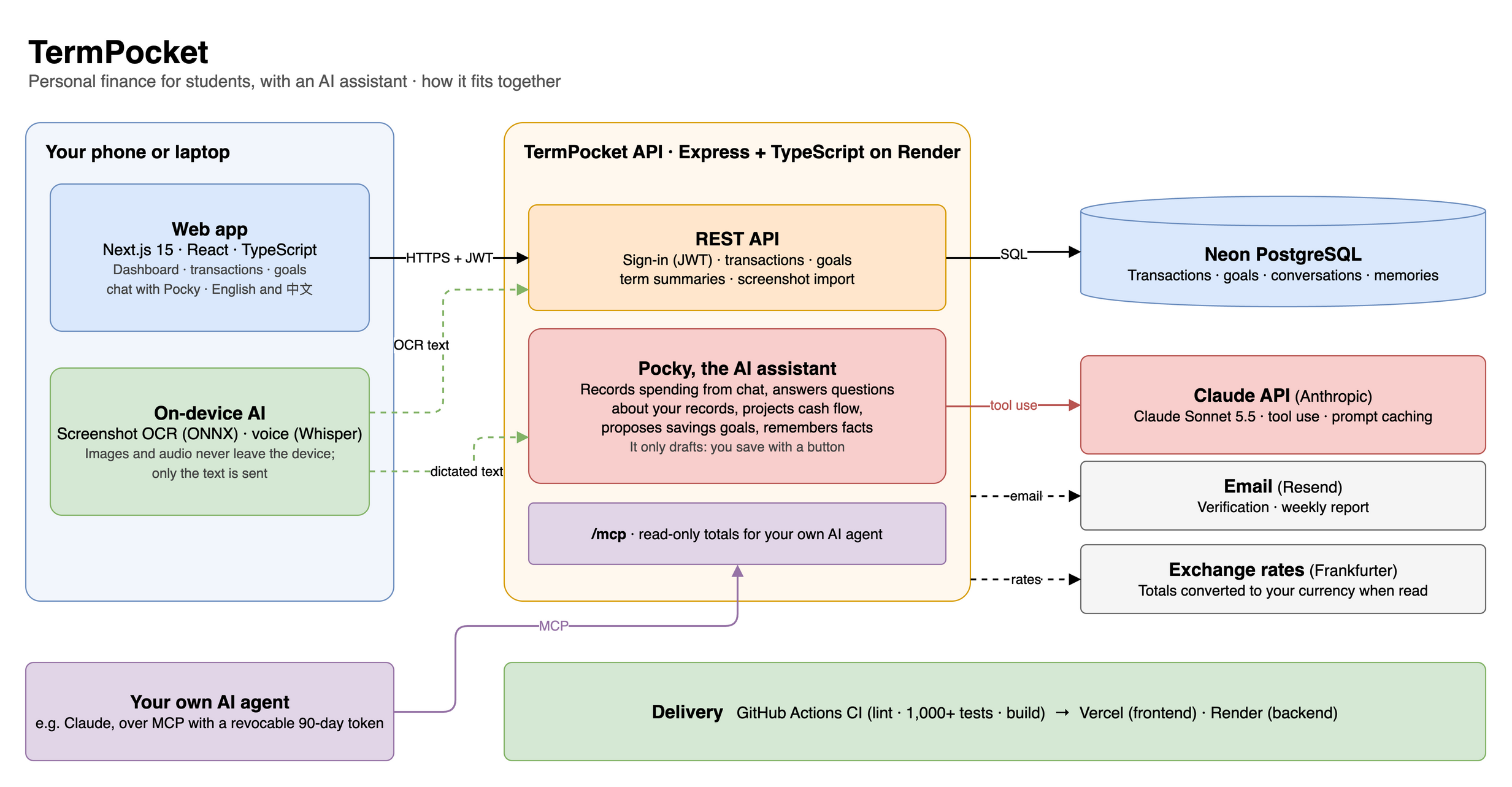
This is the overview. The detailed diagram in the repo goes down to the routers, services, scheduler and tables.

A few choices I'm happy with:
- Heavy lifting happens in the browser. OCR and speech recognition run on your device, so the server only ever sees text.
- The AI has no database access. Pocky's tools are read-only and tied to your account by the server; writes happen only through the Confirm button.
- Outside AI agents get read-only totals. If you use your own AI assistant, Settings issues a personal access token for a read-only MCP endpoint. It returns totals, never transaction descriptions, and you can revoke it any time.
- Small things matter. A date is stored as a day, not an instant, after a bug showed everyone west of the server each transaction on the day before. Verification links and access tokens are stored only as hashes.
Open source
All of TermPocket's code is public on GitHub: the app, the API, the OCR evaluation and Pocky's tools. You can read exactly what happens to your data, run your own copy, or send a fix.
Try it
Open www.termpocket.com and sign in with the demo account, john.doe@example.com / password123. It holds five terms of a made-up co-op student, alternating study and work terms, so you can see the term view with real-looking data before adding your own.
What's next: Pocky remembering things you tell it across conversations, and measuring screenshot import on phones.
I'd love feedback, especially from students. What would make you open this at the start of a term? Email support@termpocket.com.